Describe a part in a sentence, with reference images if you like, and the AI writes parametric build123d code and builds a solid model. Drag its parameters and watch it change, preview it in 3D, ask for changes, and export STEP / STL / 3MF / glTF.
5 spiral turns Loop R450 Lanes 115 mm Crossover 1.6 m Export 3MF
MeshWish workspace
prompt
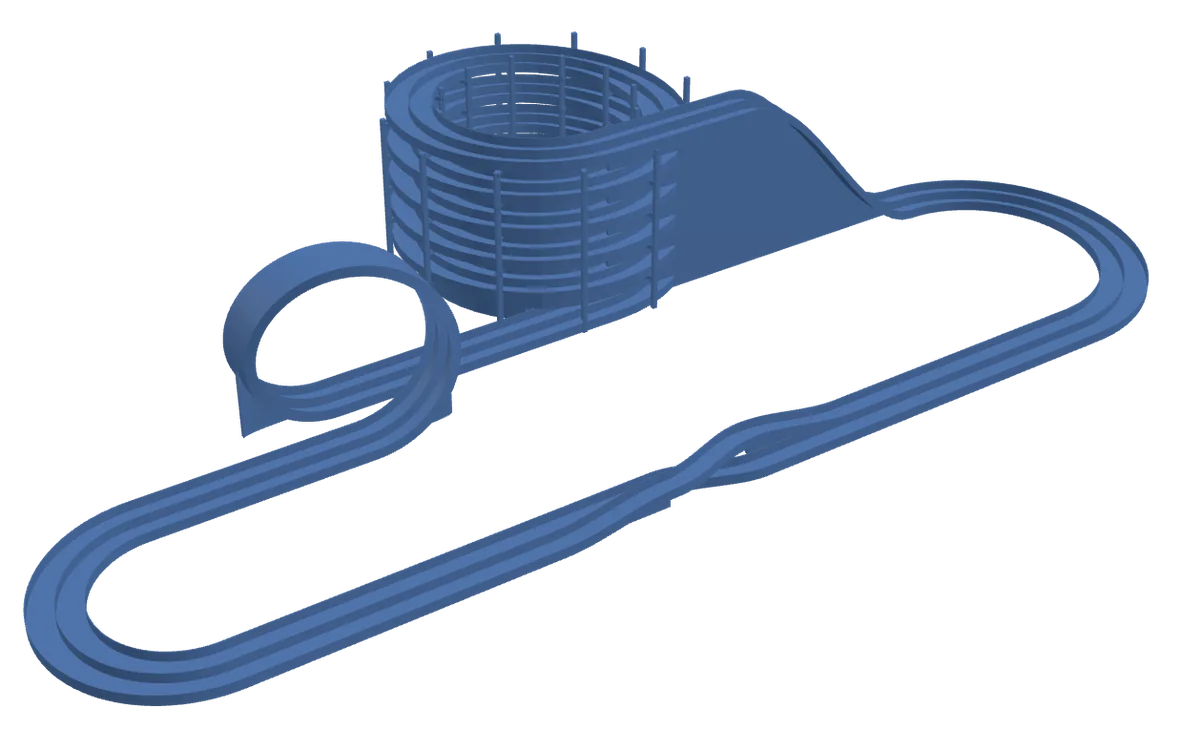
Make me a mini 4WD track with a big loop, a spiral loop and a dual-lane bridge, sized for Tamiya cars.
Solid
Valid
Prompts
7
Version
v10
Solid built, parameters live
model
dual-lane-4wd-track
Solid geometry preview
01SpeakDescribe the part
02TweakTune params, geometry follows
03PrintCheck and export
5.93 × 2.95 × 0.95 m
Geometry check
passed
Valid solid; bounding box and volume measured.
Parameters
build123d · 13 parameters
STL STEP 3MF glTF
Live controls
Each slider stop is a real rebuild
A real project: the final version of this mini 4WD track (after 7 prompts and 3 parameter edits); the prompt shown is the first one. Every slider stop is rebuilt from the track’s own script.
Made for printing
Functional mounts
Enclosures
Storage bins
Jigs
Nameplates
Simple assemblies
Examples
Real projects made with MeshWish.
Each one started as a prompt: a house that comes apart floor by floor, a gear latch, a windmill on a standard bearing, an assembled enclosure. Open any of them in 3D to turn it, zoom in and take it apart.
Two-story house that comes apart floor by floor
Prompt From these pictures … build the whole house, every floor of it … I want it at 500 × 500 mm. Each floor should come apart so you can see inside. … Did you rebuild the cabinet doors and the drawers? I want a finer model.
3 pictures + 12 prompts · 10 versions
137 parts: floors and roofs lift off, doors and drawers open
500 × 500 × 291 mm
Two-way gear latch for a door
Prompt Make me a gear knob that works as a door latch. The knob goes through a hole in the door, its handle outside and the gear inside, with a straight bar meshing above and below the gear. Turning the gear pushes the two bars out to either side or pulls them back, locking the door.
One prompt, then 3 parameter edits
8 parts: knob, gear and shaft, two rack bolts, guide base, stops
198 × 77 × 45 mm
Windmill
Prompt Make me a windmill … Shouldn’t the blades be pitched? Can the bearing be realistic, so it turns?
3 prompts · 4 versions
KFL08 flange bearing from the parts library + 8 mm shaft
106 × 94 × 189 mm
Snap-fit remote enclosure
Prompt A 3D-printable remote enclosure, modeled assembled: bottom shell, top cover, 4 snap fits, M2 standoffs for the PCB, 4 keycaps and a USB-C opening.
One prompt, first version
6 parts, in place
120 × 44 × 24 mm
Dovetail-jointed boxes
Prompt Build box blocks that join together. Focus on how they connect, and make the joints strong.
One prompt, first version
4 interlocking boxes
123 × 123 × 40 mm
Prompts are taken from the real conversations, long ones abridged. Models are as the AI built them; the posters only set color and view.
Capabilities
Turn intent into an adjustable, previewable, exportable parametric model.
01
Describe a part, the AI models it
Describe what the part is for and its size, with reference images if you have them. An AI agent writes build123d code and builds the solid in an isolated sandbox, so you get an editable parametric model, not a frozen mesh.
02
Tune parameters without regenerating
Dimensions such as width, wall thickness, hole spacing and slot count become parameters. Change one and the model is rebuilt directly, without asking the AI to start over.
03
Revise by chat, keep every version
If the preview is not right, say what to change. Every revision is kept as a version you can go back to.
04
Preview the solid in the browser
Fillets, chamfers, shells, patterns and holes all show in the 3D preview: what you see is the solid you export.
05
Standard parts and assemblies
The AI can use standard parts from a built-in library, such as aluminum extrusions, mechanical parts and parametric templates, assemble several parts, and check where they overlap, touch or leave gaps.
06
Deliver multiple formats
Export STEP, STL, 3MF or glTF from the same project, for CAD exchange, printing or web preview.
Workspace flow
From a sentence to a printable file, every step in view.
MeshWish keeps the conversation, modeling, 3D preview, parameters and export in one workspace.
live status
01 Request sent
02 First model built
03 3D view refreshed
04 New version
01
Speak
Request sent
Enter the part’s purpose, dimensions, mounting style and constraints, with reference images if you like.
02
Build
First model built
The AI writes build123d code, builds the solid in a sandbox and checks the geometry.
03
Preview
3D view refreshed
Turn the solid model around in the browser.
04
Revise
New version
Keep the conversation going and say what to change; every revision is kept as a version.
05
Tweak
Parameters applied
Adjust width, wall thickness, hole pitch, slot count and other parameters directly.
06
Print
File ready
Export STEP, STL, 3MF or glTF.
FAQ
Common questions about the product and billing.
What does MeshWish do?
You describe a part, optionally with reference images, and the AI writes parametric build123d code and builds a solid model. You preview it in the browser, tune its parameters, ask for changes, and export STEP, STL, 3MF or glTF.
Which formats can I export?
STEP, STL, 3MF and glTF, for CAD exchange, 3D printing and web preview.
Can I trust AI-generated models?
Every build checks that the solid is valid and measures its bounding box and volume, and you see the whole solid in the preview. Models can still have errors in dimensions or fit, so check them before you make them and confirm they suit your material, printer and use.
How do credits work?
A run is charged as the AI works, so simple parts use few credits and complex assemblies more. Sign-up credits are valid for one month, subscription credits expire at the end of each billing period and credit-pack credits are valid for 12 months.
How do I cancel? Can I get a refund?
Cancel anytime in your account; cancellation takes effect at the end of the current period. To request a refund, email support@meshwish.ai from your account’s email address. Requests are reviewed individually, and approved refunds are issued through Waffo Pancake for the whole order. See the Refund & Cancellation Policy.
Who runs MeshWish?
MeshWish is operated by xiaolouge, an independent developer. Payments are processed by Waffo Pancake, our Merchant of Record. Questions go to support@meshwish.ai.
Join the waitlist
Bring the first part you actually want to print.
MeshWish is in early access. People on the waitlist are invited to the workspace in order.